
Password Vaults and You
With more and more websites necessary for our everyday activities, it’s getting harder and harder to manage passwords. By now, you will know not to write passwords on post-it notes and paste them on your screen. It’s not uncommon for most people to use the same username and password on a number of sites, particularly on sites we think are less important – for example, hotel websites or some news sites. However, this is a dangerous game to be playing with your information and cyber security.
The problem is that when (not if) your information gets breached, your username and password get into the hands of bad actors who poke and prod other sites on the internet, and test where else you may have used one of these passwords, or a simple variation.
Of course, this is a cyber security challenge. We cannot easily remember hundreds of passwords, especially complex ones. We need an easy way, and we have a solution. A password vault.
But then the question you will ask is, “what happens if the vault is breached?” You need a super-secure vault. Something that easily remembers, (and creates) complex passwords for you and your colleagues – personal and work – and operates on Windows, Mac, and mobiles. It needs to be SOC2 certified so you know it’s secure.
What can a password vault offer you?

- No more remembering dozens of passwords
- Faster access to websites and applications
- Centralised system for both corporate and personal passwords
- Folders to organise and categorise credentials
- Automatic generation of audits and reports to help with tracking and compliance
- Improve the cyber security you provide your colleagues by promoting a password management system you trust
- Use strong password strings to thwart hackers
- Receive a notification of all the passwords of departing employees so clients can remove their access to company systems
- Give clients the tools to granularly grant employee access to employee systems and networks
- Meet compliance measures with comprehensive auditing and reporting capabilities
- Users can access their Site credentials quickly and easily through the native mobile apps on iOS and Android®, auto-fill to log in to websites, and apps on mobile devices
- Cross-browser extension for Google, Chrome, FireFox, Edge, and Chromium-based browsers
What’s your next step?
We’ve created a simple 9-point checklist to help you navigate the cyber-risk landscape and find the right digital security solution for you.
Kinetics can offer you a KARE Password Vault as part of KARE for Security S2 plan or you can subscribe to this standalone for $20 + GST per month for 5 users
Find out more about our Cyber Security Plans here


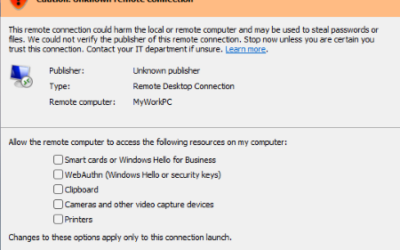
That New Windows Warning About Remote Desktop? Don’t Ignore It.
If you've opened a Remote Desktop connection file today and been greeted by an unfamiliar orange warning banner: "Caution: Unknown remote connection" then you are not imagining things. Microsoft has introduced new protections as part of its April 2026 cumulative...

Webinar Replay: Beyond Antivirus: Understanding MDR and ITDR for Modern Cyber Defence
Your traditional security isn't stopping today's attacks. Here's what will. The Problem Every NZ Business Faces Your business has antivirus software. You have firewalls. You've implemented email filtering. Yet cybercriminals are increasingly successful at bypassing...
When “Legitimate” Tools Are Used Illegitimately (like booking a meeting time)
Cyber awareness isn’t just about blocking malware — it’s about recognising intent. Recently, we received a callout from a client after a user received what initially appeared to be a genuine business opportunity. The email exchange seemed credible, replies were...

Could you get into trouble with the law if you lose a USB stick?
A lost USB stick can be a notifiable privacy breach. Here’s why that matters It sounds old school, but USB sticks are still floating around plenty of NZ businesses. A recent draft decision note from the Office of the Privacy Commissioner is a timely reminder...
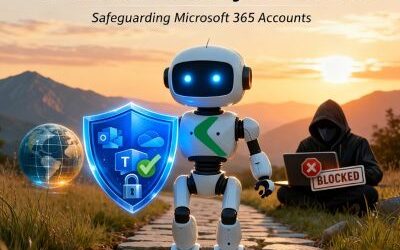
Additional M365 Security Protection Rolled Out for our KARE Foundation Customers
Turning up your cyber-security Kinetics is busy rolling out an additional security protection for Kinetics KARE Foundation customers only, designed to stop a highly active and sophisticated phishing campaign currently targeting Microsoft 365 environments worldwide. ...
Your (Home/Small Business) Router Could Be Working for Criminals Right Now
Right now, somewhere in the world, a home or office router is quietly routing cybercriminal traffic, and its owner is completely unaware. That's the reality revealed by the discovery of KadNap, a sophisticated malware campaign that has become one of the most...
When Geopolitical Conflict Becomes Your IT Problem
Lessons from the Stryker Cyberattack A global medical technology company. 56,000 employees. Operations in 60 countries. And in March 2026, systems wiped across every one of them — not because of a data breach or ransomware, but because of a school bombing in Iran....

When AI Becomes the Attack Tool
What the Mexico Government Breach Means for Your Business A cyberattack that unfolded over December 2025 and January 2026 has changed how security professionals think about AI . New Zealand business leaders should take note. A single attacker jailbroke Anthropic's...
Your Phone Is a Target
Why Mobile Security Can't Be an Afterthought Think about everything on your smartphone or tablet right now: your email, your banking app, Microsoft 365, client communications, multifactor authentication codes, and a direct line into your company's cloud systems. Now...

Webinar Replay: Decoding SMB1001. Understanding Your Cybersecurity Maturity
Cybersecurity certification doesn't have to be complex or overwhelming. Understanding SMB1001: What is SMB1001 and why it was created specifically for organisations like yours The five certification levels (Bronze to Diamond) and what each means for your organisation...