
Think Copilot Was a Let‑Down?
It’s Quietly Got Much Better in 2026
If you tried Microsoft Copilot early on and walked away a little underwhelmed, you’re not alone. We heard it a lot last year: “It’s interesting, but it’s not quite there yet.”
The thing is that Copilot doesn’t stand still. It’s one of those platforms that gets better continuously, not once every few years. And in 2026, a series of practical, behind‑the‑scenes improvements have finally tipped it from promising to genuinely useful.
So if you’ve written Copilot off, it might be time to take another look.
And for those clients that have asked us to update them on what’s new in Copilot, we hope this works for you!
Copilot Can Now Actually Do the Work (Not Just Suggest It)
One of the biggest changes this year is that Copilot has moved beyond giving ideas and started doing real work, while still letting you stay in control.
Across Word, Excel, Teams, and Outlook, Copilot now runs in what Microsoft calls agent mode. In plain terms, that means it can handle multi‑step tasks instead of waiting for you to prompt every single action.
You review everything before it’s finalised, but the heavy lifting gets done much faster.
Bottom line: Less prompting. Less back‑and‑forth. More real progress.
For example:
- In Word, it can rewrite sections, restructure documents, and apply changes directly
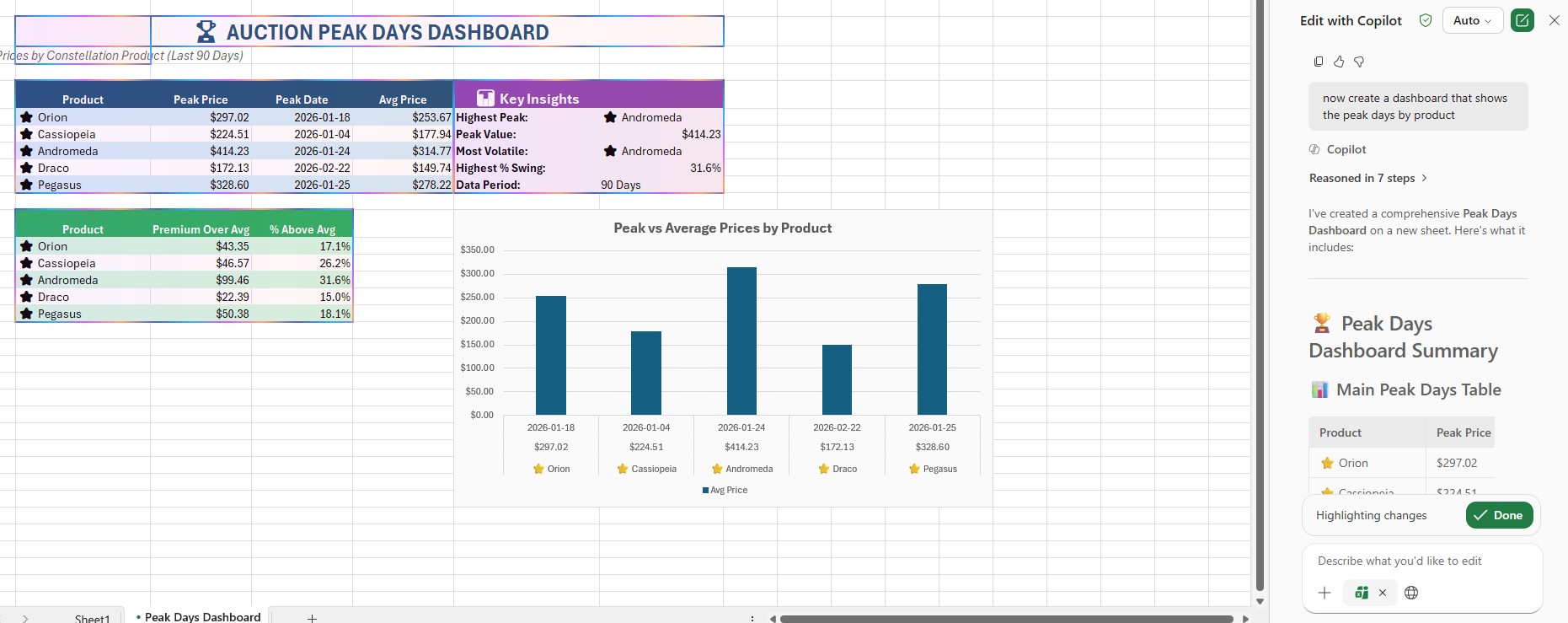
- In Excel, it can analyse data, complete formulas, build charts, and explain what it found
- In Teams, it can track meeting actions and summarise outcomes
Word Feels Like It Has a Real Editor Sitting With You
A subtle but important shift in 2026 is how Copilot behaves in Word. Instead of dropping suggested text into a side pane, Copilot can now edit the document itself straight from chat.
That means you can say things like:
- “Tighten this section”
- “Rewrite this for a customer‑friendly tone”
- “Make this sound more like a board paper”
The edits happen immediately—but they’re still transparent and reversible.
Why this matters: It turns Copilot from a “writing helper” into something closer to a collaborative editor, which saves a surprising amount of time.
Copilot on Windows Is Finally Useful Day‑to‑Day
Copilot isn’t just inside apps anymore. It’s becoming a practical starting point for work on Windows.
This year, Microsoft added the ability to:
- Open web links inside Copilot without losing your place
- Summarise and reference web pages mid‑conversation
- Create Word, Excel, PowerPoint, and PDF files directly from chat
Instead of jumping between browser tabs, documents, and notes, Copilot keeps research and outputs together.
Why this matters: It feels less like “a chatbot you sometimes use” and more like a workspace that happens to be conversational.
Excel Copilot Has Grown Up
Early Copilot demos in Excel were interesting, but limited. In 2026, that’s changed.
Copilot can now:
- Detect trends and anomalies
- Complete formulas automatically
- Generate charts with context
- Explain why something looks off
For everyday reporting and analysis, this closes a big gap for non‑specialists.
In practice: You don’t need to be an Excel power‑user to get insights anymore.
Copilot Isn’t Tied to Just One AI Model Anymore
Another big (and easy‑to‑miss) improvement in 2026 is that Copilot is no longer locked into a single AI model.
Microsoft has started supporting multiple underlying models, including options from Anthropic (Claude) alongside OpenAI models.
In practice, that gives Microsoft more flexibility to pick the right model for different types of tasks: reasoning, writing, analysis, or agent‑style work, rather than forcing one model to do everything. You won’t usually see this happening day‑to‑day, but you’ll feel it: better responses, fewer “that didn’t quite work” moments, and faster improvement over time. It also reduces dependency on any one vendor, which is a strong signal that Copilot is being built as a long‑term platform, not a one‑shot AI experiment.
Copilot in 2026 isn’t a single big “wow” moment. It’s something better: steady, practical progress.
Each update removes a bit of friction:
- Fewer clicks
- Less prompting
- More work done for you
- Better review and control
If you tried Copilot before and thought, “It’s close, but not there yet”, that experience is already out of date.
Copilot keeps improving—and this year, it finally crossed the line from interesting to genuinely helpful.